Our outbound has produced $70M+ in pipeline across 100+ B2B companies, from 10M+ emails and 700k+ cold calls.
The way we build lists has changed more in the last year than in the 5 before it.
Claude Code now does a big share of the research we used to pay enrichment tools for.
Clay still runs everything a prospect ever sees.
Put together, you get richer lists, sharper messages, and a much smaller credit bill.
CRAFT is one of them: $4M in pipeline, including meetings at Nvidia, Cisco, and Cognizant.
This is the full setup: What each tool does, how the data moves between them, and the rules that keep it safe to run at volume.
Where the money goes in a normal stack:
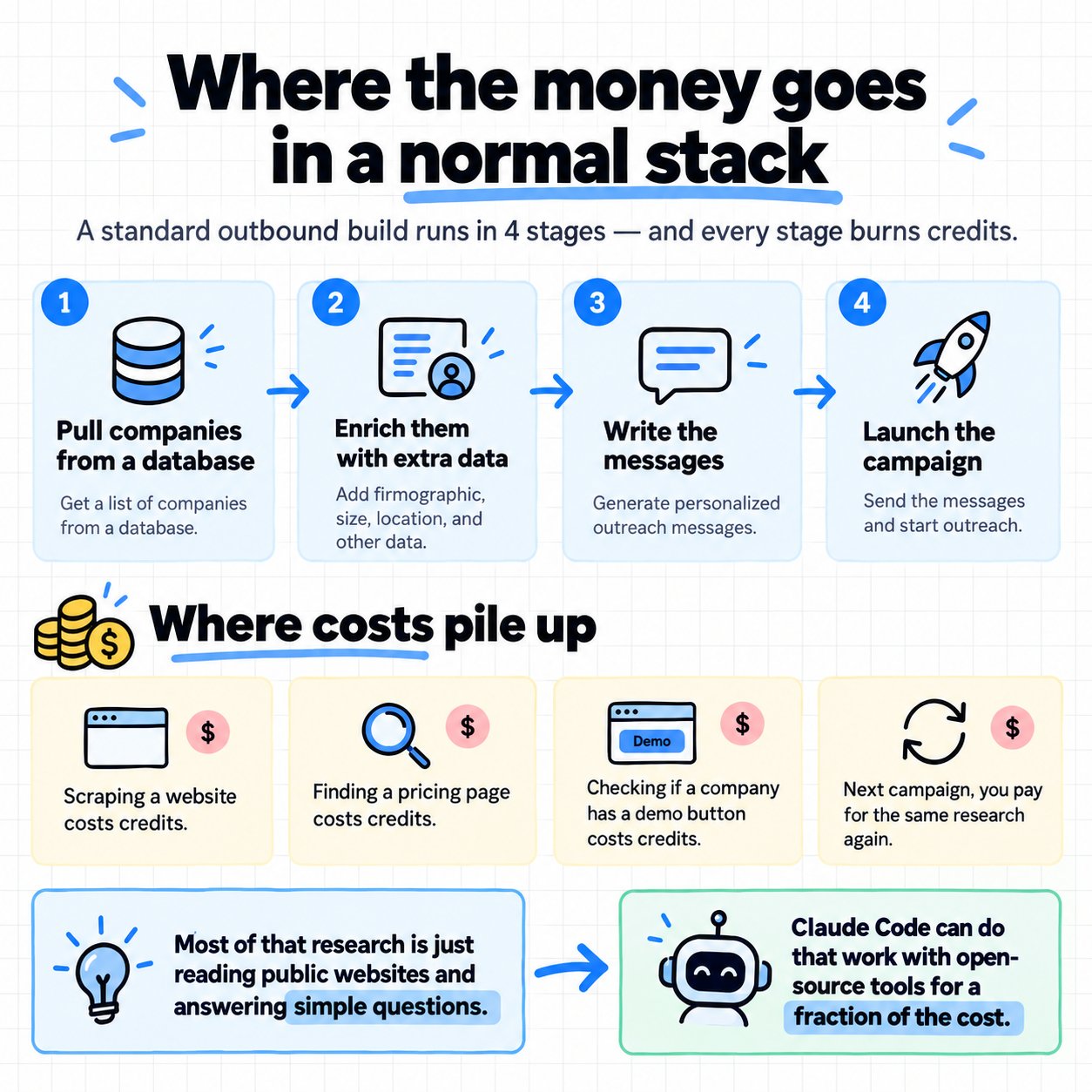
A standard outbound build runs in 4 stages.
Pull companies from a database
2. Enrich them with extra data
3. Write the messages
4. Launch the campaign
Every stage burns credits. Scraping a website costs credits. Finding a pricing page costs credits. Checking whether a company has a demo button costs credits. And next campaign, you pay for the same research again. Most of that research is reading a public website and answering a simple question about it. Claude Code can do that work with open source tools, for a fraction of the cost.
The split: who does what:
Think of Claude Code as the research analyst, and Clay as the operations manager.
Clay handles:
The starting company list
- Contact finding and email waterfalls
- QA and logic on every row
- Human review before sending
- Pushing campaigns to the sending tool
Claude Code handles:
Scraping company websites
- Finding pricing and demo pages
- Counting open sales and marketing roles
- Spotting the tech a site runs on
- Reading and classifying website copy
- Pulling data from public sources
Claude Code is Anthropic's coding agent, and it runs in your terminal. You describe the research you want in plain English, and it writes and runs the scripts to get it. The rule we follow: AI gathers the data, and Clay runs anything customer-facing. Claude is great at collecting information. Clay gives you the guardrails, the logic, and the predictable outputs you need before a message reaches a real person.
The build, step by step:

Step 1: Build the company list in Clay.
Clay's company search and enrichment is still one of the best starting points there is. Pull your ICP by industry, size, location, and any firmographic filters that matter. Export the list with each company's domain.
Step 2: Send Claude Code through every website.
Give Claude Code the list of domains and tell it what to find. A prompt we'd use: "For each domain in companies.csv, visit the homepage, pricing page, careers page, and about page. Record: whether there's a pricing page and the lowest listed price, whether there's a 'book a demo' button, the number of open sales and marketing roles on the careers page, the main tools detected in the site's code, and a 1-sentence summary of what the company sells and who to. If anything isn't clearly on the page, write 'not found'. Save the results to research.csv, 1 row per domain." Claude Code will write the scraper, run it, and handle sites that fail. It uses open source libraries for the scraping, so the cost is mostly your Claude subscription and a little server time.
Step 3: Classify with Claude.
Raw website text becomes useful once it's sorted. A second prompt turns it into fields you can filter on: "For each row in research.csv, read the company summary and website copy. Classify: business model (SaaS, services, marketplace, ecommerce, other), main buyer (SMB, mid-market, enterprise), pricing model (per seat, usage, flat, custom), and whether they sell through a sales team. Add a confidence score from 1 to 5 for each field." Anything scored below 4 gets a human check.
Step 4: Store everything in your own database.
Push the results into a database like Supabase. This is a big part of the savings. You own the research now, so the next campaign starts from data you already have. Re-run the scripts every couple of months to keep it fresh.
What the table looks like.
1 row per company, keyed on the domain.
Domain and company name
- Pricing model and lowest price
- Demo button, yes or no
- Open sales and marketing roles
- Tools detected
- Business model and main buyer
- Confidence scores
- The date it was last checked
The date column matters, since it tells you which rows are due a refresh.
Step 5: Bring it back into Clay.
Import the research into your Clay table, matched on domain.
Getting the data back in.
The simplest route is a CSV import into the Clay table. At volume, send it through a webhook, so new research lands in Clay as soon as it's ready. From here, Clay runs the production work.
Finding the right contacts
- The email waterfall: Prospeo first, then fallbacks
- Verifying every email
- Writing the message lines from the research
- QA checks on every row
- Pushing approved leads to EmailBison
Every row a prospect will see goes through Clay's logic and a human review first.
What the research unlocks:
The best campaigns run on the best context. A job title tells you who to email. The research tells you what to say.
Signals Claude Code can pull from a website:
Pricing model and price point
- A demo button, meaning a sales-led motion
- Open sales roles, meaning growth
- Open marketing roles, meaning a push for pipeline
- The tools they run
- How they describe their product
- Who they say they sell to
Putting it on a schedule.
Once the scripts work, an automation tool like n8n can run them on a timer. A weekly run checks every account in the database for changes, like new sales roles or a new pricing page. Accounts that change move up the call list that week. That turns a one-off list into a live feed of buying signals.
Turning it into a score.
Give each signal points based on what predicts a buyer for your offer. A company hiring 3 SDRs with a demo button and per-seat pricing scores high for an outbound agency. A company with self-serve pricing and zero sales roles scores low. Call and email the highest scores first.
What scored research looks like at scale.
For Eden Studio, we mapped 69,204 accounts and enriched each one with 19 data points. Every account got an intent score, and the highest-scoring accounts got called first. They booked 53 meetings in 50 days.
Turning it into message lines.
Use the research to write 1 relevant line per company, about their market or their situation. "Saw you're hiring 3 SDRs at [company]" is specific, true, and easy to check.
A message built from the research:
"Saw [company] is hiring 3 SDRs. We built CRAFT $4M in pipeline from outbound. Worth seeing how?" 1 checkable fact, 1 result, and 1 small question. We've measured the difference: across 1,160 campaigns, adding the prospect's project and location lifted one script to 14.5% replies, with the plain version at 1 to 3%. That's context: a checkable fact about their business. It earns attention, and it stays honest about how well you know them.
The rules that keep it safe:
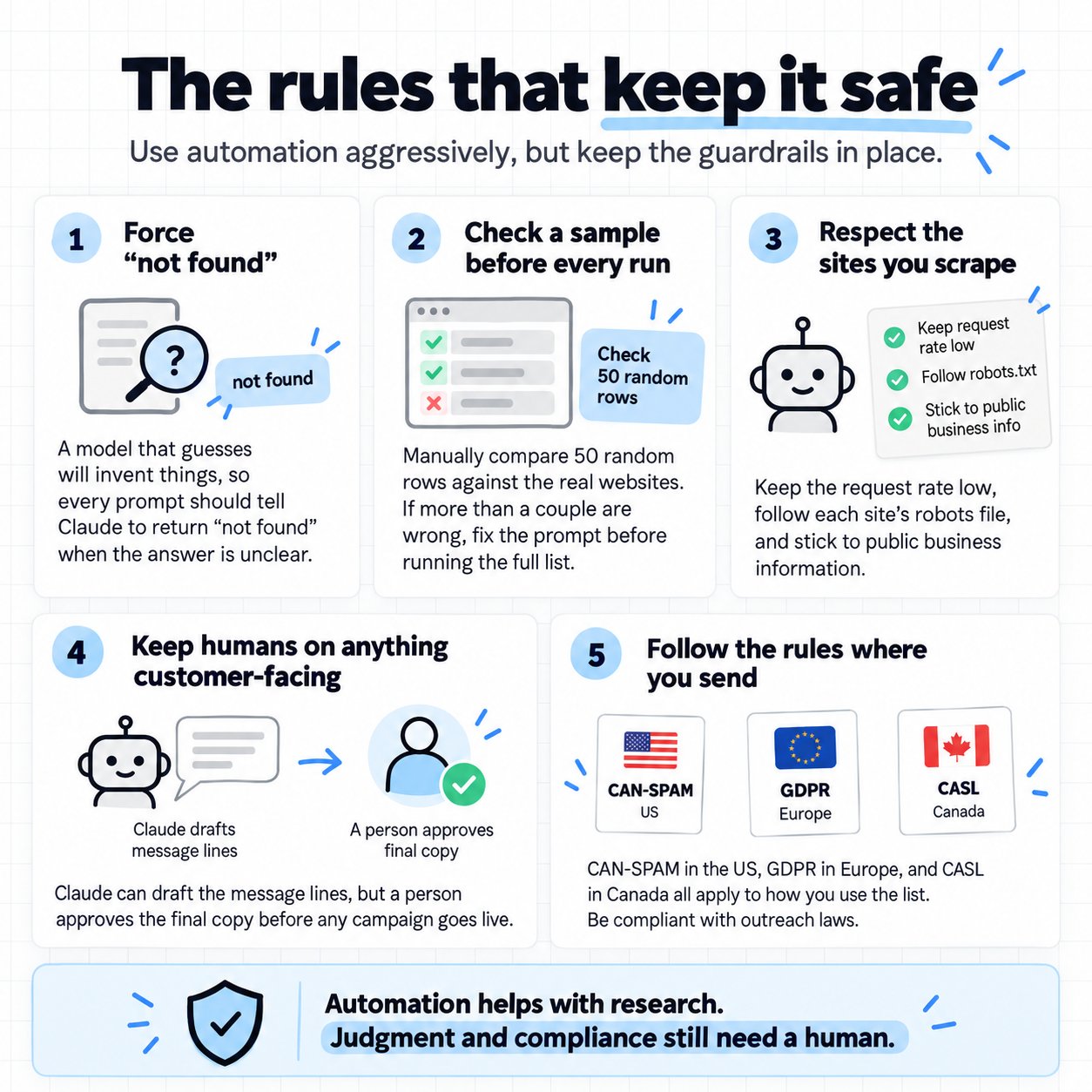
Force "not found".
A model that guesses will invent things. Every prompt tells Claude to write "not found" when the answer isn't clearly on the page.
Check a sample before every run.
Pull 50 random rows and check them by hand against the real websites. If more than a couple are wrong, fix the prompt before running the full list.
Respect the sites you scrape.
Keep the request rate low, follow each site's robots file, and stick to public business information.
Keep humans on anything customer-facing.
Claude can draft the message lines. A person approves the final copy before any campaign goes live.
Follow the rules where you send.
CAN-SPAM in the US, GDPR in Europe, and CASL in Canada all apply to how you use the list.
The cost math:
The savings come from cutting paid enrichment for work that's really just reading websites.
What Claude Code covers:
Website scraping
- Pricing extraction
- Demo and CTA detection
- Tech detection
- Content classification
What you still pay for:
Clay, from $185 a month on the Launch plan, or $495 on Growth
- Contact data and email finding, like Prospeo
- Email verification
- Your sending setup
Clay also stopped charging for failed lookups in its 2026 pricing change, which helps the waterfall costs too. And every company you research once stays in your database for the next campaign.
The bottom line.
Let Claude Code gather the data. Let Clay run the campaign.
If you want help building and running an outbound system for your business, Book a Strategy Call.