Our team has built $70M+ in pipeline for 100+ B2B companies, off 10M+ cold emails.
Every one of those campaigns starts with a list.
Today, the lists for almost all of our clients get built by 1 AI agent our team built, called Hermes.
Anyone on the team can message it in Slack, from a laptop or a phone, at any hour.
It sources the companies, finds the people, enriches them, validates the emails, and researches the accounts.
Here's exactly how it's set up, what it's connected to, and what a request looks like from start to finish.
What's inside:
What Hermes is
What it's connected to
A request, start to finish
How to write a request that works
The lists Clay can't build
Account research on autopilot
Where Claude Code takes over
The tradeoffs
What Hermes is:

Hermes is our AI GTM agent.
Our team built it (full credit to them), and my part was mostly the skill files it works from.
Where it lives.
It runs on a VPS, a server that stays on 24/7.
So it never depends on someone's laptop being open.
How the team talks to it.
Through Slack.
Everyone on the team messages the same agent in the same channel.
Behind it sits 1 Codex account doing the actual execution, so the whole team shares 1 back end.
Why that matters.
Say a client needs a lead list and you're out on a walk.
You open Slack on your phone, message Hermes, and the list is building before you get home.
Most of the time we work from a computer, but the option is always there.
What it's connected to:
An agent is only as useful as what it can reach.
The APIs.
Hermes is wired into somewhere between 20 and 40 different databases and enrichment tools.
That covers the full chain:
TAM sourcing
Scraping
Enrichment
Email validation
Account research
Personalization
The Clay CLI.
For standard lists, Hermes pulls through the Clay CLI.
That's 1 of our default ways of pulling leads.
The skills repo.
This is the part that makes it ours.
We keep a full GitHub repo of skills: written instructions for every task Hermes runs, from how to scrape a source to how to qualify a lead.
That repo is probably worth a million dollars on its own, which is why we'll never show it publicly.
Hermes reads those skills before every job, so it works the way our team works.
A request, start to finish:

Here's a real example I ran on camera.
The prompt.
"Build me a lead list of B2B SaaS companies with 10 to 100 employees. Find the VP of Sales, Head of Sales, or any senior sales role. Every company needs at least 3 SDRs or junior salespeople, and a live pricing page."
Most databases can filter on the first 2 parts.
The last 2 (3+ salespeople and a public pricing page) need actual research on every company.
It asks before it runs.
Hermes comes back with a few questions first, like which people to target and what the delivery format should be.
If the prompt already covers it, you tell it to run off the original request.
It shows a sample first.
Before building the full list, it returns a small sample of companies.
Each one comes with:
The employee estimate
Where that estimate came from (it pulls from multiple sources, including PitchBook)
The live pricing page
The evidence it's B2B
The decision maker
3 salespeople, with their LinkedIn profiles and titles
You check the sample, and if it's right, it runs the full list.
That sample step saves a lot of wasted credits, because a bad brief gets caught after 5 rows, before it hits 5,000.
Why the extra data points matter.
A company with 3+ SDRs is paying people to book meetings.
A live pricing page tells you how they sell and roughly what they charge.
Those 2 fields turn a generic list into a list of companies that are clearly feeling the problem you solve.
The qualification rate on lists like this is much higher than anything we pulled the old way.
How to write a request that works:
The agent is only as good as the brief you give it.
Every request we send has the same 5 parts.
1. Who the company is.
Industry, size, location and business model.
"B2B SaaS, 10 to 100 employees, US-based."
2. Who the person is.
The exact titles, plus the seniority you'll accept.
"VP of Sales, Head of Sales, or any senior sales leader."
3. The custom data points.
This is where the value is.
Anything a database can't filter on, written as a yes/no check the agent can verify.
"At least 3 SDRs on LinkedIn" and "a live pricing page on the website" are both checks it can confirm.
4. The output.
Which columns you want back, and in what format.
Name the fields, or you'll get whatever the agent decides is useful.
5. The size.
How many rows, and whether to send a sample first.
2 more example requests.
For an agency selling to ecom brands:
"Build a list of DTC brands in the US doing paid social, with an ad running in the Meta Ad Library right now and a Shopify store. Find the founder or Head of Growth. Include the brand's ad count and the store's product categories."
For a recruiting firm:
"Build a list of US logistics companies with 50 to 500 employees that have posted 5+ open roles in the last 30 days. Find the Head of People or COO. Include the number of open roles and the 3 most recent job titles."
Each one names a company type, a person, 1 or 2 custom checks, and the fields to return.
That's the whole formula.
The lists Clay can't build:
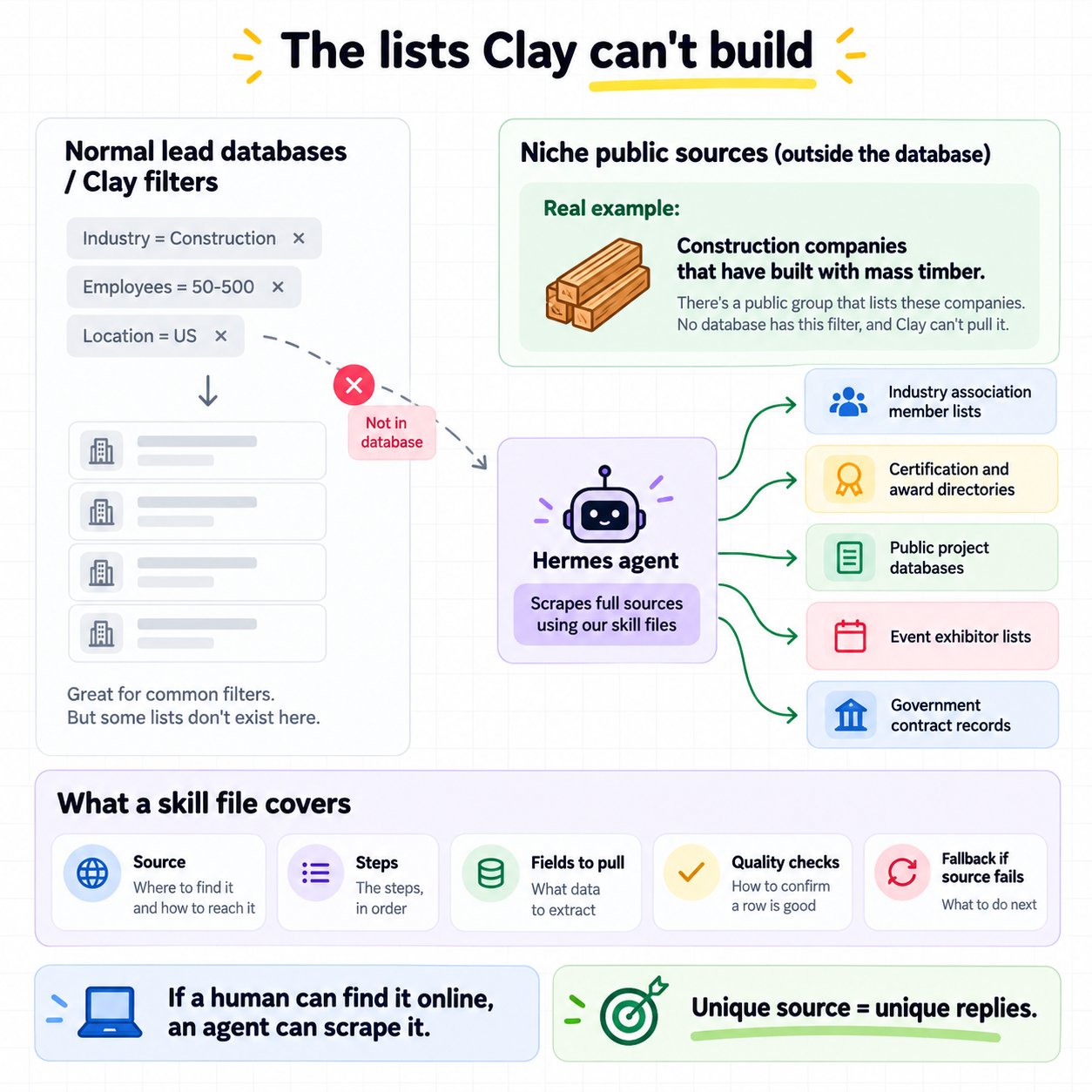
Some of the best lists live outside every lead database.
A real example.
A client came to us wanting construction companies that have built with mass timber.
There's a public group that lists those companies.
No database has that as a filter, and Clay can't pull it.
We prompted Hermes to scrape the full source, and it did, using the skills in our repo.
Why this matters.
When your list comes from a source nobody else is pulling, your prospects aren't getting the same 10 emails from everyone else using the same database.
That's where the replies come from.
Where to look for sources like this.
Industry association member lists
Certification and award directories
Public project databases
Event exhibitor lists
Government contract records
If a human can find the list on the internet, an agent with the right skill can scrape it.
What a skill file covers.
Our repo stays private, but the shape of a good skill is simple.
The source, and how to reach it
The steps, in order
The fields to pull
The checks that confirm a row is good
What to do when a step fails
That last part matters most.
A skill that says "if the website doesn't list the team, check LinkedIn next" keeps the agent moving when the first source comes up empty.
Write 1 skill per job, so each one stays short and easy to fix.
Account research on autopilot:
Once the list is built, Hermes can go deeper on every account.
The follow-up prompt.
On the same example, I asked it for a 300 to 500 word research report on each company, covering where they need help with their GTM and outbound, and where Pipeline.tech could help them.
It came back with a full report on each account.
What a good report covers.
What the company sells, and to who
How they sell today (team size, channels, pricing model)
Signals worth mentioning (hiring, funding, launches)
The gaps in their outbound
Where we could help
Hermes delivered it as a separate file.
I'd rather have it inside the list, as a column next to each account, so the research sits right next to the contact it belongs to.
What this is good for.
ABM lists, where every account is worth a lot and deserves real research.
Sales call prep, where the rep walks in already knowing the company.
And personalization, where each email can reference something real about the business.
At scale.
Hermes can do this for huge lists, though it gets expensive at volume.
For a small list of top-tier accounts, it's perfect.
The point.
The same agent covers both ends: 50,000 rows of clean contacts, or 50 accounts researched like a human spent an hour on each.
Where Claude Code takes over:

Hermes is mainly our list builder.
It can write messaging, and it does a good job, since it reads the same skill files.
For copy, though, we use Claude Code, because working in the terminal is easier than going back and forth in Slack.
The full flow.
Hermes builds and enriches the list
Hermes researches the accounts
Claude Code writes the messaging off the research
The campaign goes into the sending setup
The team reviews everything before it sends
Every campaign we run for clients now goes through some version of this.
It's become a standard part of how we work, and the campaigns are performing great.
How far this has come.
3 or 4 years ago, I was finding emails by hand, enriching lists from Apollo(.)io one by one, and uploading them to a verifier manually.
Now it's a Slack message.
The tradeoffs:
It's cheap.
Because we connected our own APIs, Hermes costs less to run than any database or workflow tool we've used, Clay included.
It needs maintenance.
The agent goes down sometimes.
APIs change, and skills need updating.
It has to be built from scratch.
For an agency whose whole business is GTM, that's worth it.
If GTM is only 1 part of your business, building and maintaining your own agent is a lot.
What you'd need to build your own.
A server that stays on 24/7
A Slack app the agent listens to
An AI account doing the execution
API keys for your data and enrichment tools
A library of skills, 1 per job
Someone who owns fixing it when it breaks
Start with 1 skill for 1 list type you build every week.
Once that runs cleanly, add the next one.
If you want help building and running an outbound system for your business, Book a Strategy Call.