This is the whole build, from buying domains to handling replies. Follow it and you can be sending 10,000 a day...
Start with the maths:
What 10,000 a day produces
Run this with conservative inputs, meaning average messaging and an average offer.
One positive reply per 1,000 emails
22 working days a month, so roughly 220 positive replies
25% converting to a meeting, so 55 meetings booked
70% show rate and 80% qualified, so roughly 31 qualified meetings
20% close rate, so around 6 deals a month
The full setup runs about $1,500 a month. Against most B2B LTVs that CAC is low enough to justify the build on arithmetic alone. Run these numbers with your own LTV and close rate before you spend anything. If your deal size is $2k and your close rate is 10%, the model looks completely different to a $50k deal at 20%.
Domains and inboxes:

10,000 sends a day on Google needs 500 mailboxes. At two mailboxes per domain that is 250 domains. At three per domain it is 167, which is cheaper on the domain side, and that is what I run at this volume.
Building the domain list:
Ask Claude for 200 .com variations of your main domain
Export to CSV
Bulk search on Porkbun, 100 at a time
Select what is available, add to cart, check out
Plenty will be taken, so generate more variations and run it again. .com carries the highest price of the common extensions. .xyz and .info work well and cost less. Then go to ScaledMail, select the 10,000 per day Google order, and bring your own domains, which comes in cheaper than buying through them. They handle the DNS, the DMARC, and every other setting you would otherwise configure by hand across 167 domains. They also upload the accounts straight into your sequencer. Inbox cost at this volume sits around $1,700. Give the domains their warmup window before anything sends. Two to three weeks minimum, ramping volume gradually, so the providers build trust in the sending pattern.
The sequencer:
I use EmailBison. Isolated IPs, a strong pool, and it handles high volume sending properly at 10,000 a day. Once ScaledMail finishes provisioning, the accounts appear under sender emails and the campaigns get built there.
Building a list that supports the volume:
Three tools, two of them databases.
Prospeo is the general database. High quality data, kept current, good coverage across industries. Use it for any broad list.
Ocean.io is for lookalikes. Drop in a company domain and it returns companies like it. If you want more companies resembling owner.com, meaning software selling into restaurants, that is one search. At 10,000 a day you need volume in the list. A lookalike list of 800 companies is a strong campaign motion at lower send rates. At this volume you want closer to 50,000 contacts.
Building the broad list in Prospeo:
Set the industry, meaning software development as an example
Set a custom headcount range, meaning 50 to 200
Set titles, meaning owner, C-suite, director, head, or VP in sales and marketing
Set location if you only want one country
Select all, apply, export
Keep the filters simple here, since the qualification happens in the next step.
Clay is the third tool, and it does qualification, enrichment, and verification. Database filters miss things, so every list gets a qualification layer. An AI step reads each company description and classifies whether it matches the target, meaning confirming a beauty ecommerce brand is actually one. Enrichment runs after that, and only on the companies that passed. Enriching people at companies you already dropped burns credits for nothing. From there the waterfall finds missing emails, verifies them, normalises company names, and cleans the record. Expect single-source enrichment to give you 50-60% valid coverage, and a stacked waterfall to reach 85%+ on the same list.
Messaging:
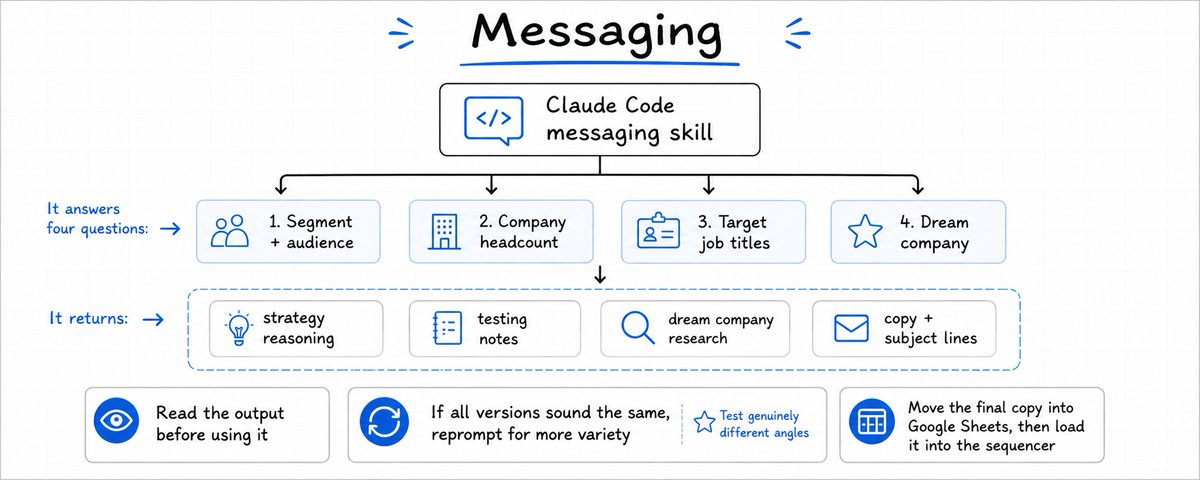
I run a messaging skill in Claude Code. It asks four questions:
The segment and audience
The company headcount range
The target job titles
A dream company, meaning who you would write to if you could only write to one
Answer those and it returns the strategy reasoning, testing notes, dream company research, and the copy with subject lines attached. Read the output properly before you use it. If every variation comes back on the same angle, reprompt for more variety. You want genuinely different angles in the test, since running five versions of one idea tells you very little. Then move the copy into a Google Sheet and load it into the sequencer.
Building the campaign:
In EmailBison, create the campaign and upload the lead list. Build the sequence from scratch:
Paste the email and add split-testing variants
Variables go in uppercase parentheses
Keep it plain text
Add spintax to the subject line
For the follow-up, add a step at a two or three day delay with a re: subject line. Schedule and settings:
Start at a random time rather than 8am or 9am on the dot, since every sequencer defaults there
Monday to Friday only
Open tracking off
Plain text on
No unsubscribe link
Include auto-replies in the stats, which is a useful deliverability gauge
Maximum emails per day set to 10,000
Maximum sequence starts per day also set to 10,000
The first email to a new contact gets a higher reply rate than any follow-up in the sequence. Maxing sequence starts moves you through new contacts faster, which is where the returns sit.
Handling the replies:
Replies land in the master inbox, and this is the layer that converts everything upstream into revenue. I run an inbox management agent in n8n. What it does:
Pulls replies from the sequencer
Checks whether each one is positive
Reads calendar availability and picks slots to offer
Drafts a full response
Pushes the reply and the draft into a dedicated Slack channel
From there whoever runs the inbox reviews it, edits if needed, and sends from the sequencer. Speed-to-lead decides the outcome here. The same reply volume produces very different results depending on whether a human responds in five minutes or five hours. Give the inbox a named owner with a response target attached.
Running it day to day:
The system needs weekly attention to stay healthy. What to check:
Bounce rate per campaign, with anything above 1% pulling the list for review
Reply rate by segment, so you can cut the segments producing nothing
Mailbox health, meaning any inbox showing placement problems comes out of rotation
List replenishment, since 10,000 a day consumes contacts fast
Domain age, with new domains warming while current ones send
You can start at lower volume and scale into this. Half the setup at 5,000 a day still produces a real pipeline, and the architecture is identical.
Also, if you want an in-house GTM team contacting your entire market every 90 days, Book a Strategy Call.
Most clients are running 20-30 booked calls a month off the standard build, and you own every system we put in, even if you leave.
Our team has booked 30,000+ meetings & generated $70M+ in pipeline across 100+ B2B companies.