We've generated $70M+ in pipeline for 100+ B2B companies, across 10M+ cold emails and 700k+ cold calls.
A lot of that came from local markets, and every local list we build starts in the same place: Google Maps.
If you sell to HVAC companies, dentists, clinics, gyms, contractors, salons, or any local service business,
this is the full process for turning Google Maps into leads you can email and call.
Why local businesses live on Google Maps:
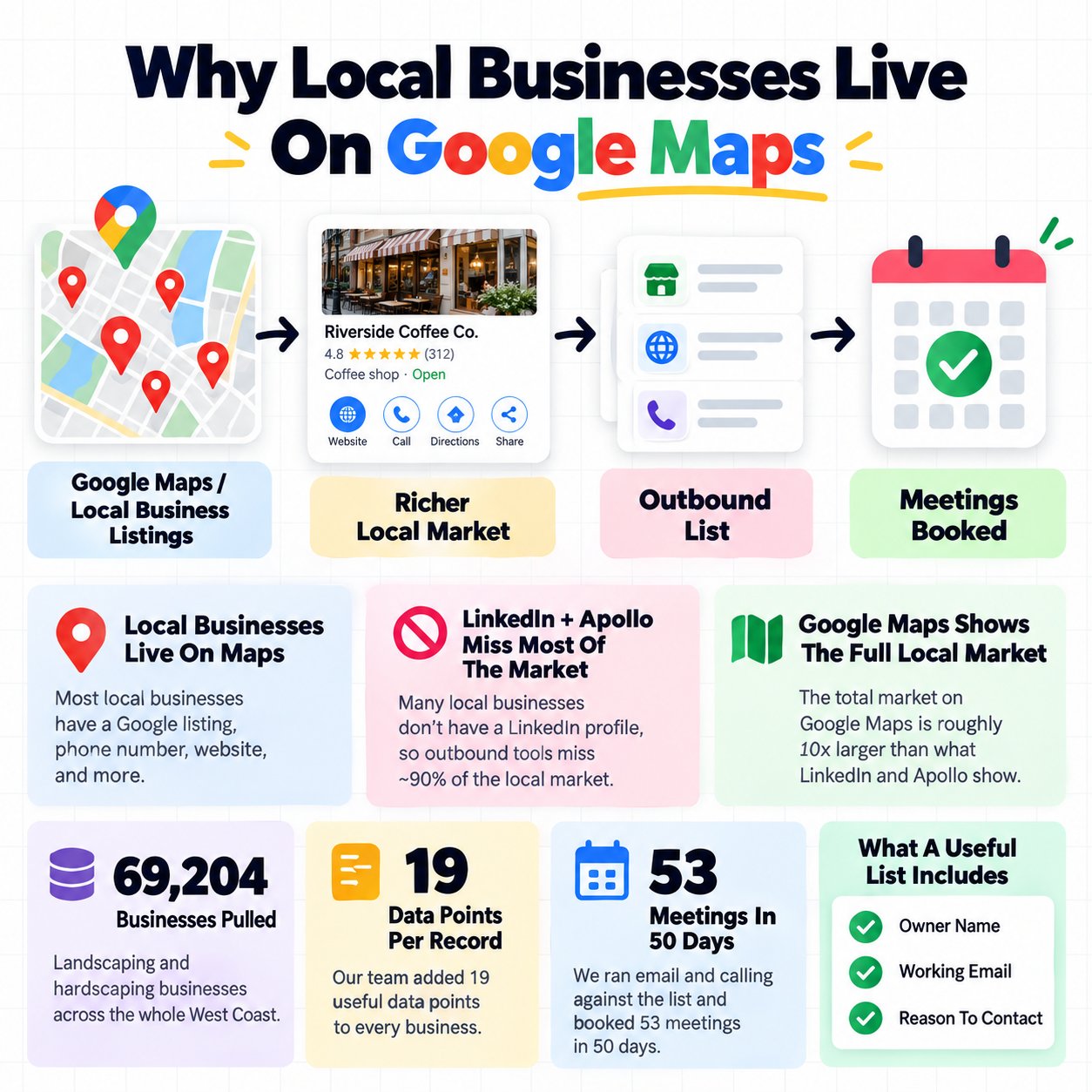
Apollo and LinkedIn work well when your buyer has a job title, a company page, and a work email.
A local business owner usually has a Google listing, a phone number, a website from a few years ago, and answers their own phone.
Plenty of them run their whole business without a LinkedIn profile.
That's why outbound built only on LinkedIn and Apollo misses around 90% of the local service market.
The full market on Google Maps is roughly 10x what those databases show.
What a full Maps build looks like.
Eden Studio sells design software to landscaping businesses, and they were starting outbound from zero.
Our team pulled 69,204 landscaping and hardscaping businesses off Google Maps, covering the whole West Coast, and added 19 data points to every record.
Then we ran email and calling against the whole list.
They booked 53 meetings in 50 days.
What a useful local list includes.
A business name and a website on their own is research.
A list is ready for outbound once each business has an owner name, a working email, and a reason to contact them.
Pulling the raw list:
Start with one niche and one area, like dentists in 3 states or roofers in Florida.
How to pick the niche.
Pick a business type where one new customer is worth a lot to the owner, like dentists, med spas, roofers, or law firms.
Then check there are enough of them. A few hundred businesses across your area runs out fast, while a few thousand gives you room to test and improve.
What to pull for each business:
Name
- Phone
- Website
- Address
- Category
- Star rating
- Review count
Search by zip code.
The US has 32,000+ zip codes, and each search returns a separate batch of businesses.
Searching a whole city shows you a fraction of what's there. Running the same search zip code by zip code shows you the full market.
Filter by review count.
Review count tells you how busy a business is.
A business with 300 reviews has served thousands of customers, and one with 5 reviews is a very small operation.
Set a minimum to remove the tiny ones, and a maximum to remove large chains with their own buying process.
The tools, and what they cost.
MapsData pulls Maps listings with emails already attached, taken from each business's website.
Free: 500 leads with emails a month
- Starter: $15 a month on yearly billing, for 10,000 a month
- Pro: $39 a month on yearly billing, for 50,000 a month
- Scale: $79 a month on yearly billing, for 300,000 a month, with up to 100,000 per search and API access
Scale works out to around $3.30 per 10,000 leads, and you only pay for leads that come with an email.
It covers the US, Canada, the UK, and Australia, across 4,000+ business types.
As an example, their own demo pulled 1,284 dentists across California, Texas, and New York, with emails from each site.
Other options:
RapidAPI endpoints, around $250 for 2.5 million raw results
- Apify, roughly 5 to 10x more expensive
- Serpdeck, cheap but more limited
- D7, the most data points per business, at a higher price
If you're testing a new niche, the MapsData free tier is enough to prove it.
If you already know your offer works, Scale is the cheapest way to get volume with emails attached.
Re-pull every campaign.
Businesses open, close, and change details constantly, so a list from 3 months ago has already gone stale.
Finding the owner:

An email to the owner by name gets far more replies than one to a general inbox.
Where to find the owner:
Crawl each business's website, focusing on the About, Team, and Contact pages and any bios in the footer.
A crawl finds the owner around 80% of the time.
Tools like Claygent or Firecrawl can read those pages at volume.
When the website comes up empty, use Prospeo's people search as a backup.
The prompt we use:
Read these pages from [website]. Find the name of the owner, founder, or main decision maker. Only return a name that appears on the page next to a title like owner, founder, principal, or doctor. If you're unsure, return "not found". Return the first name, last name, and the title exactly as written.
The rule that protects your domains.
Whenever the model is unsure, it writes "not found".
A made-up first name in a cold email destroys trust instantly, and the replies it causes damage your sending reputation.
Put that instruction in the prompt in plain words, and check a sample of 50 results by hand before running the full list.
Keep the AI costs down.
Put the instructions at the top of the prompt and the variables for each business at the bottom.
That lets the model reuse the instructions it has already processed, which cuts the cost a lot when you're running tens of thousands of rows.
Getting a working email:
One email finding tool on its own finds valid emails for 40 to 60% of a list.
Running several tools in a row gets you to around 90%.
The order we use:
Prospeo first
2. Icypeas for anything Prospeo missed
3. A website crawl for anything left
Stop as soon as one source finds a valid email, and log which one found it.
After a few campaigns, that log tells you which tools are worth paying for in your niche.
Verify everything.
Run every email through a verifier like MillionVerifier, then run the catch-all domains through a second checker like BounceBan.
Catch-all domains accept every email and then bounce some of them later, so they need the second check.
Keep your bounce rate under 1%.
Use the general inboxes too.
For local businesses, addresses like info@ and team@ get read, often by the owner.
On one local list we found 3,621 named business addresses and 4,553 general or nameless ones.
For the general addresses, it took 54.97 contacts to produce a lead.
The named ones took 94.94.
That's 125.7% more contacts, converting almost twice as well.
A custom foodservice disposables manufacturer we work with did the same thing.
When owner names were missing, we sent to their info@ and personal addresses, and those campaigns still produced strong results inside their 1,061 leads in 70 days.
Two rules for general inboxes.
This works for local service businesses.
For ecommerce brands, stick to named contacts, since their general inboxes go largely unread.
Send to them from separate inboxes, so a weaker campaign stays away from your main sending setup.
If you send from personal-style inboxes through EmailBison, budget around $150 a month extra to keep that setup separate.
Writing to a local owner:

Every agency sends "saw your Google listing", so owners have learned to skip it.
What works is a fact about their local market.
A nearby business they'd recognize
- A local competitor, when the comparison is true
- Their reviews, but only when they're 4 stars or higher
Serpdeck can pull this kind of detail at volume.
Why local facts work.
They show you understand their market, and they stay honest about how well you know them.
Across 1,160 of our campaigns and 4,055 versions of scripts, a version naming the prospect's project and location pulled a 14.5% reply rate,
while the identical script without them sat at 1 to 3%.
Keep it short.
Use one local detail, one clear offer, and one question.
A local owner reads it on their phone between jobs.
A message built this way:
[First name], noticed [nearby competitor] has been picking up a lot of reviews in [area] lately. We help [business type] like yours get more booked jobs from Google. Want me to send over a quick comparison of where you rank against them?
That's 3 sentences, one local fact, and an easy yes.
Lead with a free, useful offer.
A free audit of their Google reviews, a quick report on how they rank against nearby competitors, or a sample of the work.
Something they can say yes to straight away, with the call following once they're talking.
Calling the list:
Every Google Maps listing comes with a phone number, and it's the most underused field in the export.
Local owners live on the phone, which makes them the easiest market to call.
For Eden Studio, our calling booked them 33 of the 53 meetings, at a 9.2% connect rate.
How to call a Maps list:
Start with the highest scoring businesses
- Open with why you're calling, using a fact from their listing
- Ask if that problem is costing them work this month
- Offer a specific time for a meeting
When to call.
Log the hour of every connect for 2 weeks, then put your dialing into the hours that answer most.
Our outbound agency's base package runs 25,000 emails and 500 calls a day, and books 20 to 30 meetings a month.
The rules that keep it working:

1 niche, 1 area, 1 offer.
Trying to cover several niches at once kills your reply rate before anything else does.
Score the list for intent.
Eden Studio's scoring added points for things like slow-quote complaints in reviews, a designer job posting, and a burst of fresh reviews over the last 90 days.
The highest scorers got called first.
Remove duplicates on business name, city, and email domain.
Remove anyone you've already contacted.
Check the rules.
In the US, courts have backed collecting public business data, including in hiQ Labs v. LinkedIn.
How you use the list is your responsibility, so follow CAN-SPAM, GDPR, and CASL where they apply. (Check with a lawyer for your own case.)
The mistake that kills most Maps campaigns.
People stop at the CSV.
A list becomes outbound once every row has an owner name and a working email.
Your first week:
Pick one niche and one area
2. Pull 500 businesses
3. Crawl their websites for owner names
4. Run the email waterfall and verify
5. Add one local fact to each lead
6. Send a small batch and start calling
7. Keep what gets replies, and expand to new areas before new niches
If you want help building and running an outbound system for your business, Book a Strategy Call.